Software Architecture
architecture, documentation, c4-model
en
Imagine asking four developers to draw the same e-commerce solution. You would probably get four different diagrams, all functional, but each one with its own icons, arrows, shapes, legends, and text boxes.
The problem appears when those diagrams need to be explained. Each one has to make the application context, level of detail, involved components, and relationship types clear. Without a minimum standard, documentation depends too much on who created the diagram and who is explaining it.
UML solves part of this problem, but it also brings a level of complexity that does not always fit the routine of product teams. Very often, we need something lighter: easy to learn, developer-friendly, and useful for conversations with both technical and non-technical people.
This is where the C4 Model fits. It proposes a set of abstractions for documenting software at different levels, without locking the team into a specific notation or tool. That helps with architecture discussions, onboarding, technical reviews, and alignment between engineering and product.
Mapping the code
The C4 Model uses an analogy similar to maps. On a map, you can look at the whole world, zoom into a country, enter a city, and finally inspect a specific street. With software, the idea is the same: start from the big picture and zoom in only when the detail adds value.
This view is divided into four levels:
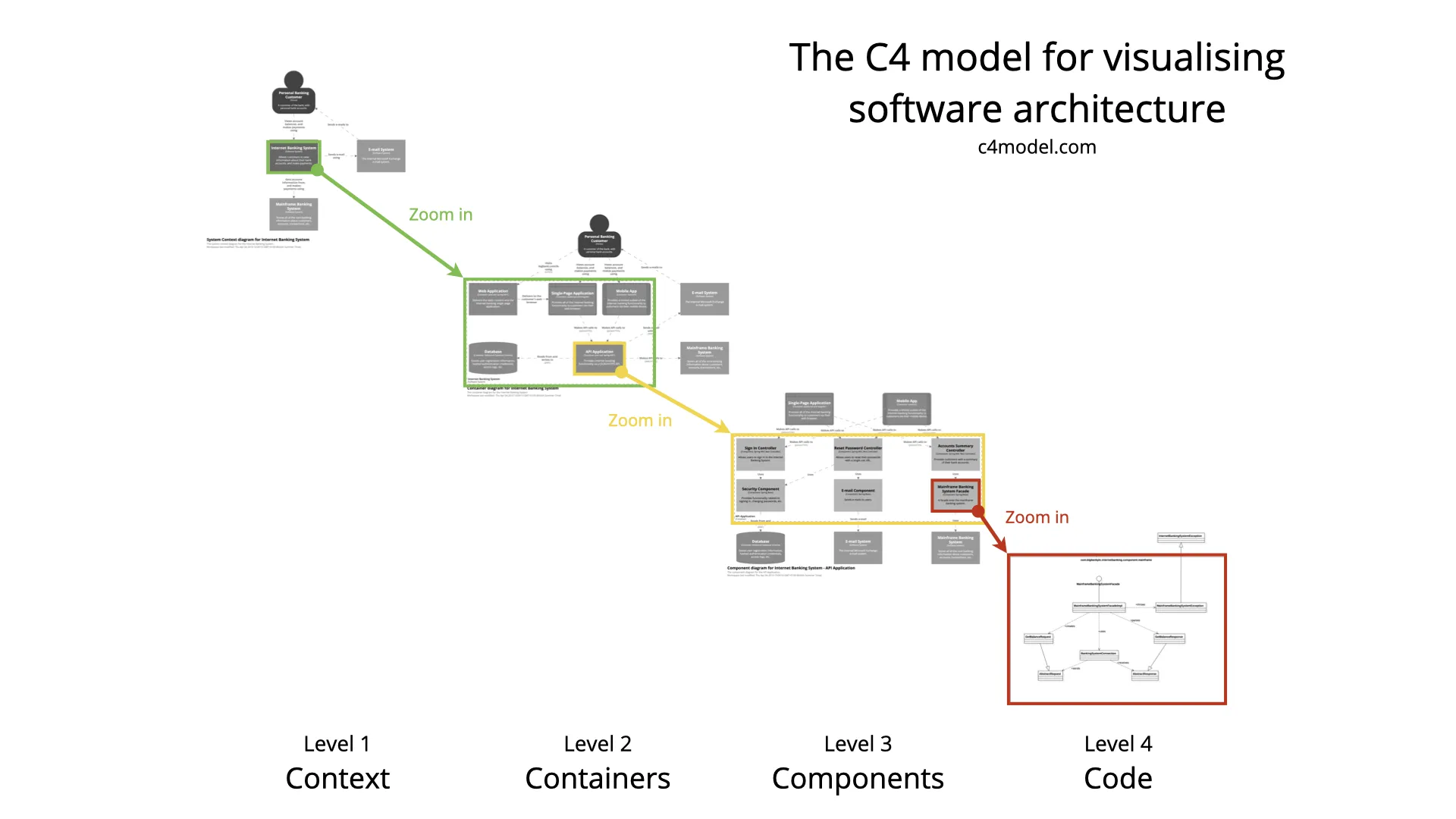
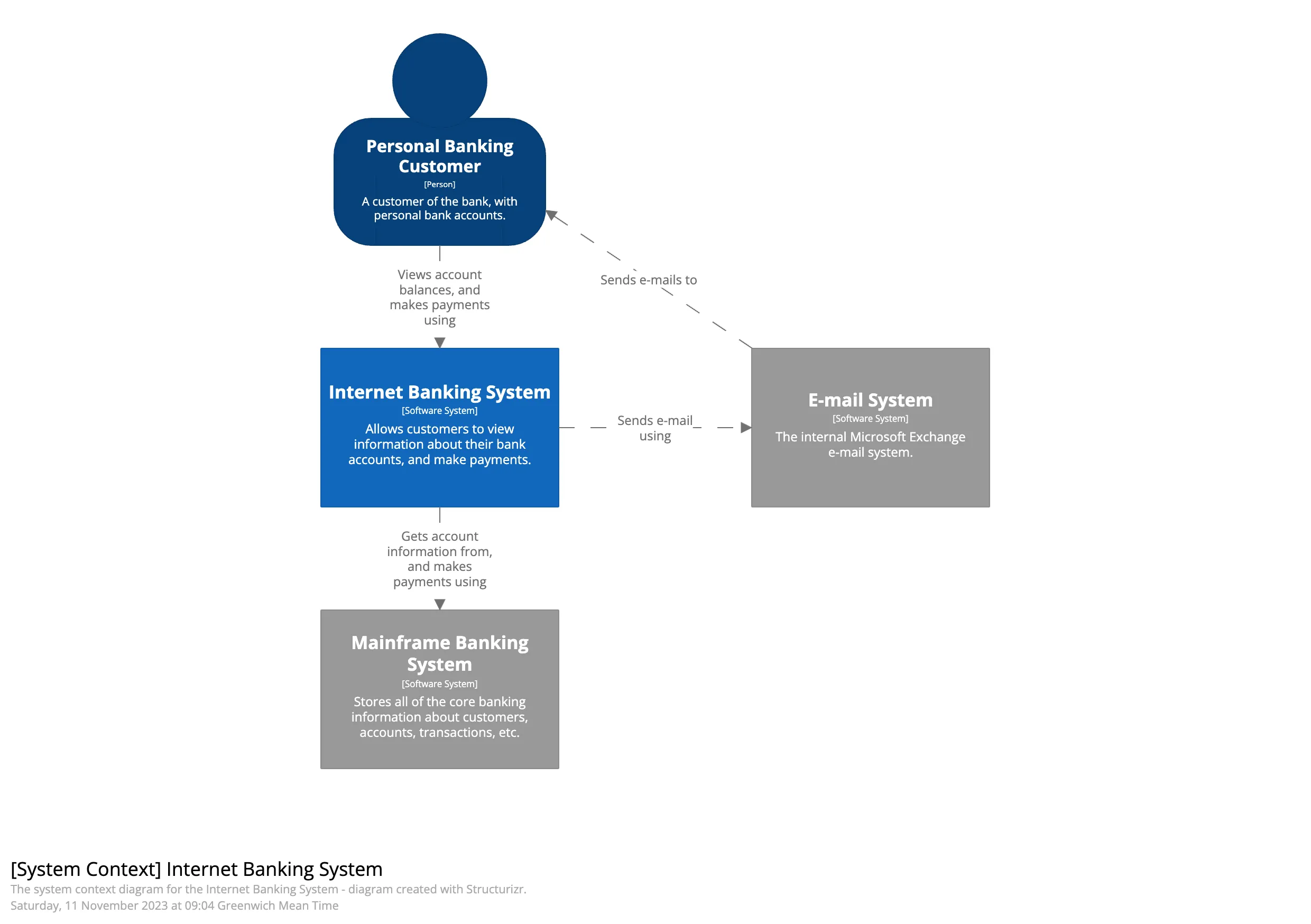
Context (Level 1): shows the system in relation to the world around it. This includes users, external systems, and relevant dependencies. It is the ideal view for explaining the system’s purpose and its main interactions without getting into technical details.
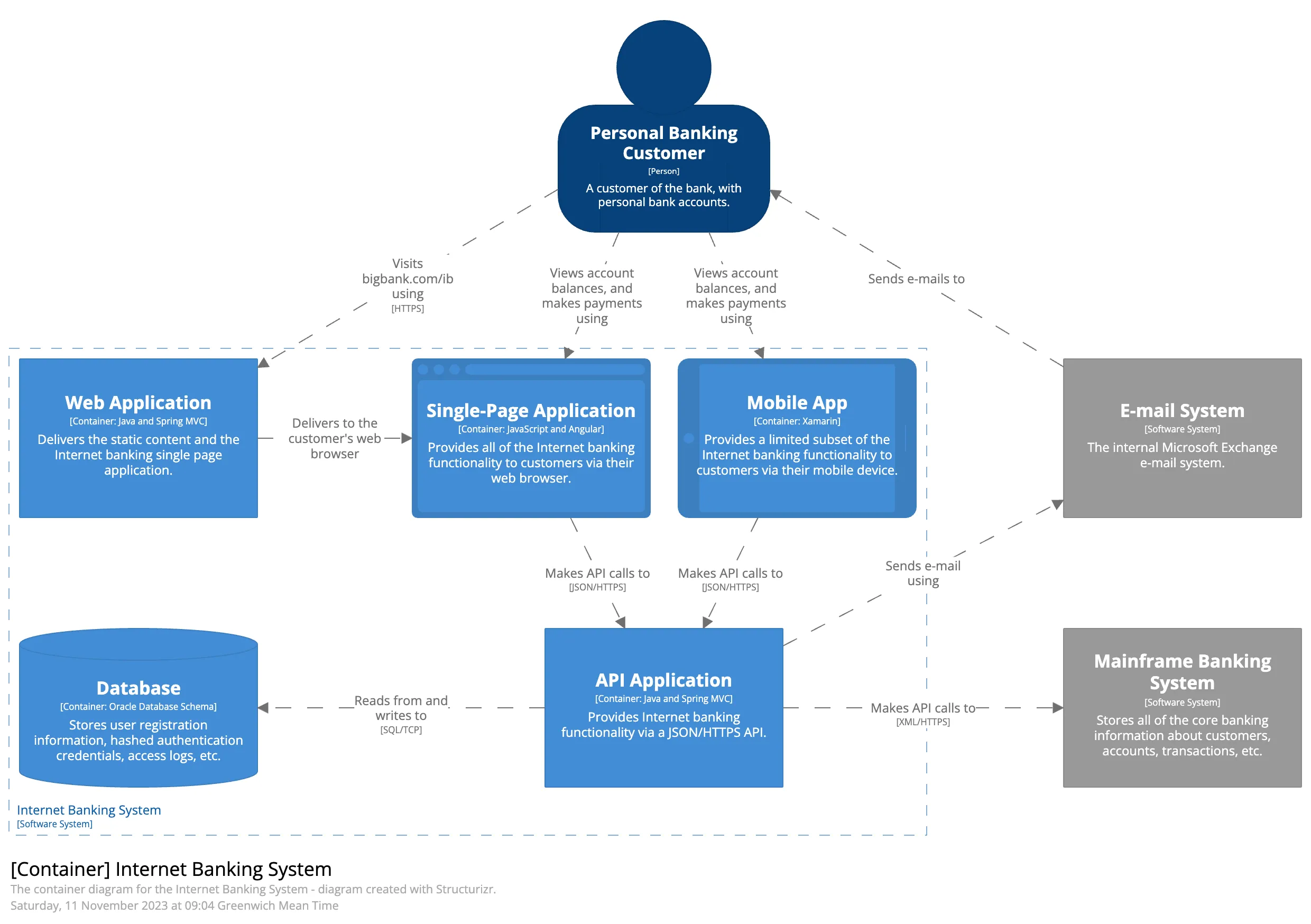
Containers (Level 2): presents the major executable parts or storage elements of the system, such as an API, a web application, a mobile app, a database, or a queue. The goal is to explain how these parts communicate and what each one is responsible for.
Components (Level 3): details the internal structure of a container. This level helps explain modules, use cases, adapters, internal services, or other relevant parts of the code. It is useful when the conversation needs to move from the general architecture into the internal design of a specific application.
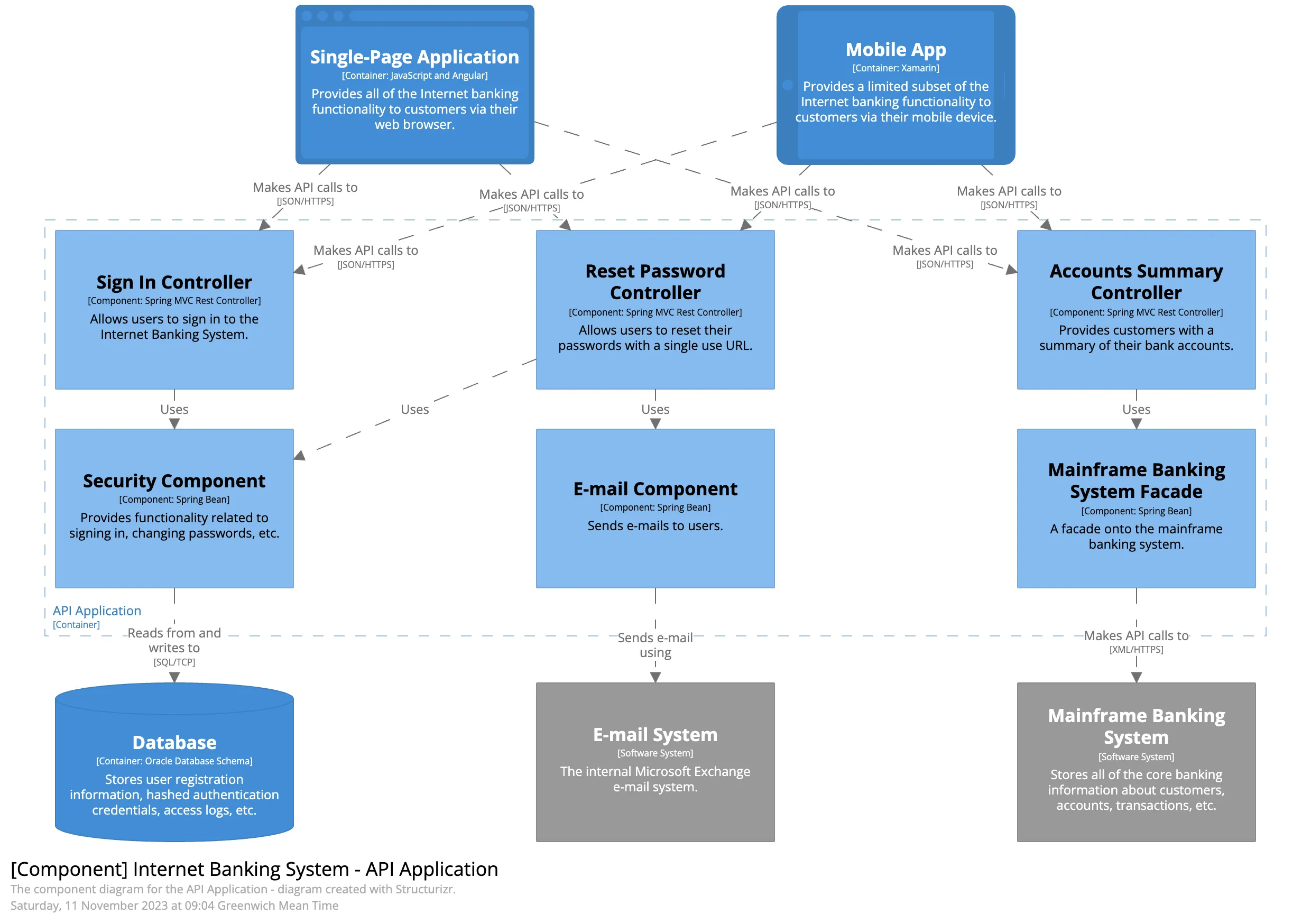
Code (Level 4): is the most detailed level. It represents classes, interfaces, functions, or structures close to the source code. It is usually the least used level in continuous documentation because the code itself is often the most up-to-date source for this kind of detail.
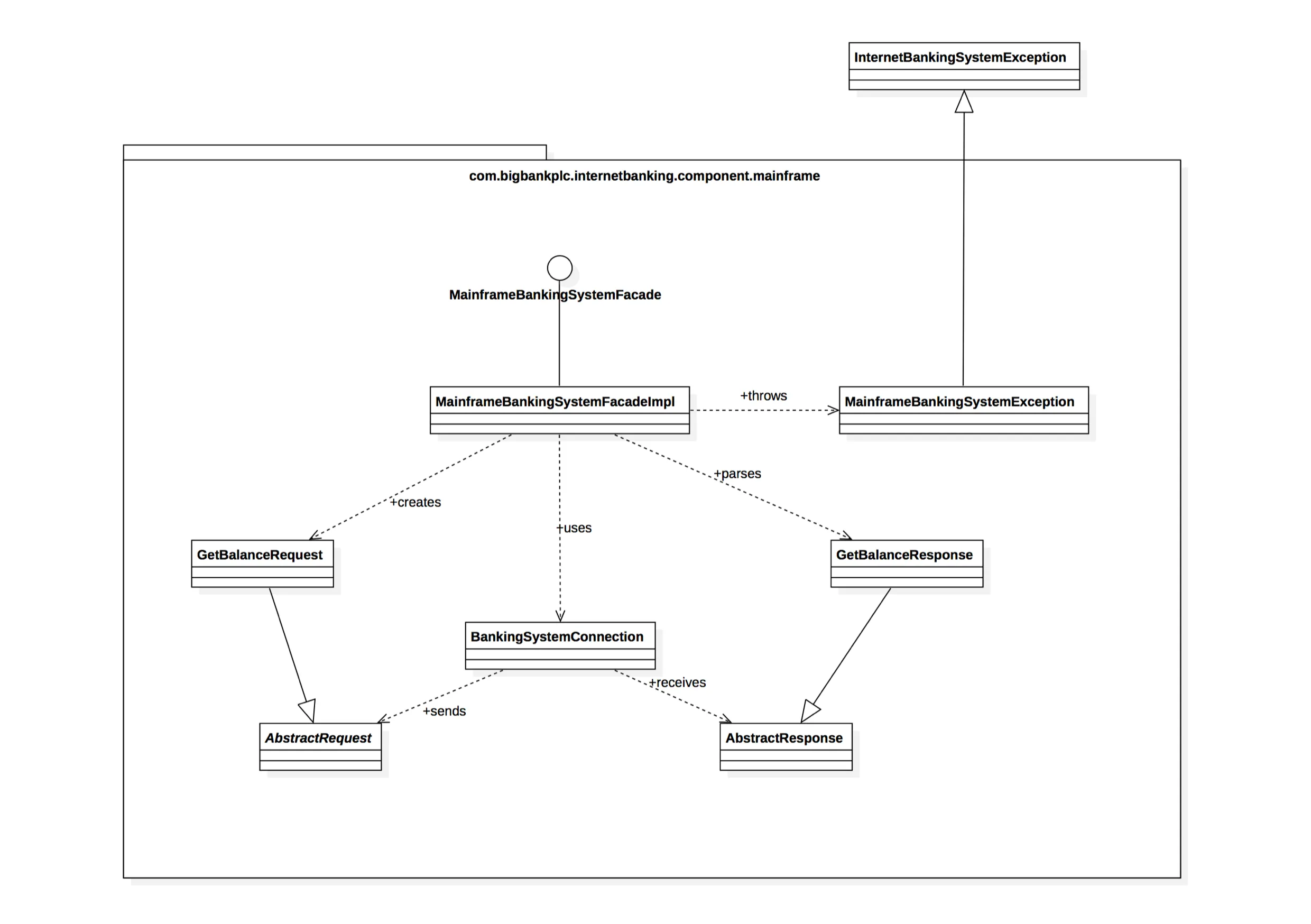
The main point is that you do not need to draw all four levels every time. C4 is a communication tool, so it is worth documenting only what helps the team make decisions, review architecture, or understand the system with less friction.
Abstractions
The C4 Model is an abstraction-first approach. Abstractions help simplify the representation of the system and allow technical details to be added gradually. To build these diagrams, we use a few main elements:
People
People represent users or groups that interact with the software. They can be customers, administrators, operators, partners, or any other role that matters to the context.
System
A software system represents something that delivers value to its users. It can be the system you are building or another external system it interacts with.
Container
Despite the name, container here is not directly related to Docker. In C4, a container represents an application or storage element that runs separately inside the system. It can be a back-end, front-end, database, queue, bucket, mobile application, worker, or another process with its own responsibility.
Components
In software development, component can mean many things. In the C4 Model, it represents an internal part of a container: modules, services, use cases, adapters, gateways, or other units that help explain how that container was organized.
How to start in practice
Start with the context diagram. It forces an objective conversation about who uses the system, which external systems exist, and where the main boundaries are.
Then move to containers when you need to explain responsibilities, integrations, deployments, or communication between applications. This level usually delivers a lot of value because it connects architecture with operations.
Use components only when there is a real question about the internal structure of a container. If the team already understands the code well, this level may not be necessary. If there is confusion about modules, dependencies, or internal flows, it can prevent many repeated explanations.
Conclusion
C4 is a great tool for communicating and documenting architecture in small or large teams. Its simplicity helps developers and other stakeholders understand the system without depending on a long explanation every time.
Maintainability is also a strong point. There are visual tools, such as draw.io, and text-based tools, such as Structurizr, that make it easier to keep documentation alive for longer.
Source: C4model.com